Introduction
What is CYS?
Connect Your SELF is a decentralized authentication tool that allows users to securely access applications while maintaining full control over their digital identity. By leveraging self-sovereign identity and verifiable credentials, it empowers users to authenticate without relying on centralized services or sharing unnecessary personal information.
Traditional systems rely on third parties like Google and Facebook, or password databases to verify user identities, creating a “single point of failure” and exposing their personal information to potential breaches. In contrast, CYS places the user at the center of the process, eliminating the need for intermediaries.
What truly sets CYS apart is how it optimizes user autonomy. Each authentication challenge is fully transparent, showing exactly what information is being requested. Users and businesses retain complete control over their data, deciding what to share and with whom.
How it Works
When a user visits a site that supports CYS (Connect Your SELF), instead of entering a username and password, they're prompted to respond to a challenge. The challenge requests proof of their identity ownership.
In some cases, the challenge may also request molecules (verifiable credentials) along with specific preferences for which issuers have attested them.
For example:
- A healthcare platform might request proof of a medical license issued by a trusted medical authority.
- An age-restricted site could ask for proof that a user is over 18 as attested by a government authority.
Before responding, users can review the challenge in their identity wallet. This includes details about what information is being requested and any issuer preferences. Users can then choose whether or not to create a response.
If they decide to accept the challenge, a response is generated and cryptographically signed with their private key. This signed response is sent back to the application. The client (application) can then:
- Verify the response's authenticity by checking the cryptographic signature.
- Review the information included in the response.
Based on this verification, the client determines whether to authenticate and grant access.
Why Integrate CYS?
Security Enhancements
-
Eliminates passwords: No password management, reducing the risk of phishing and credential theft.
-
Cryptographic proof: Authentication is based on cryptographic signatures, ensuring high-level security.
-
Resilience to attacks: Decentralized architecture eliminates single points of failure common in centralized systems.
User Control & Privacy
-
Self-sovereign identity: Users maintain full control over their digital identity and credentials.
-
Selective data sharing: Users can share only the specific information (molecules) requested, minimizing unnecessary data exposure.
-
Privacy by design: No need to store sensitive data on centralized servers, reducing the risk of breaches.
Flexibility & Customization
-
Molecules (verifiable credentials): Supports any type of molecule, from age verification to professional licenses, with issuer-specific preferences. Creates a deeper level of authentication past just account presence.
-
User-driven identity: Users can manage credentials from multiple issuers, enabling diverse use cases across industries.
-
Distinct identities: Users can maintain separate identities for different contexts (e.g., personal vs. professional).
Reduced Risk & Liability for Applications
-
No data storage: Applications don't need to store user credentials, reducing liability and compliance burdens.
-
Mitigated compliance risks: Helps meet privacy regulations like GDPR by minimizing data collection.
-
Improved security posture: Reduces exposure to breaches and attacks targeting user data.
User Experience Improvements
-
Faster login: Users can authenticate within a few clicks/taps.
-
Faster onboarding: No need for users to create and manage multiple accounts or remember passwords.
Scalable & Future-Proof
-
Decentralized infrastructure: Scales without the bottlenecks of centralized systems.
-
Future-ready: Built on open standards and decentralized technologies, making it adaptable to evolving digital identity needs.
Transparency & Trust
-
Transparency: Users and businesses see exactly what information is being requested and shared.
-
Trustless verification: Applications can verify credentials without relying on a third party.
-
Data integrity: Credentials are cryptographically signed, ensuring authenticity and tamper-proof verification.
Use Case Examples
The following use cases are instances where CYS has been implemented already but is by no means an exhaustive list.
KYC
-
Financial services: Banks and fintech apps can request KYC verifiable credentials to meet regulatory requirements.
-
Cryptocurrency platforms: Users can share verifiable credentials to comply with KYC/AML regulations without revealing excess information.
-
Social Media platforms: Users can share verifiable credentials that prove they are human and not a bot.
Business/Corporate
-
Employee access: Secure login to enterprise systems with verifiable employment credentials.
-
Partner portals: Partners can authenticate using specific credentials, ensuring secure access to B2B platforms.
Web3
-
Token-gated communities: Users can prove ownership of specific NFTs or tokens to access exclusive events or content.
-
DAO membership: Authentication for DAO participation by proving membership.
Events and Ticketing
- Event access: Attendees can verify identity or ticket ownership through a verifiable credential.
Education/Certification
-
Online courses: Students can verify enrollment or certifications for access to educational resources.
-
Professional certifications: Platforms can request proof of certification or training completion for specialized roles.
Implementation Overview
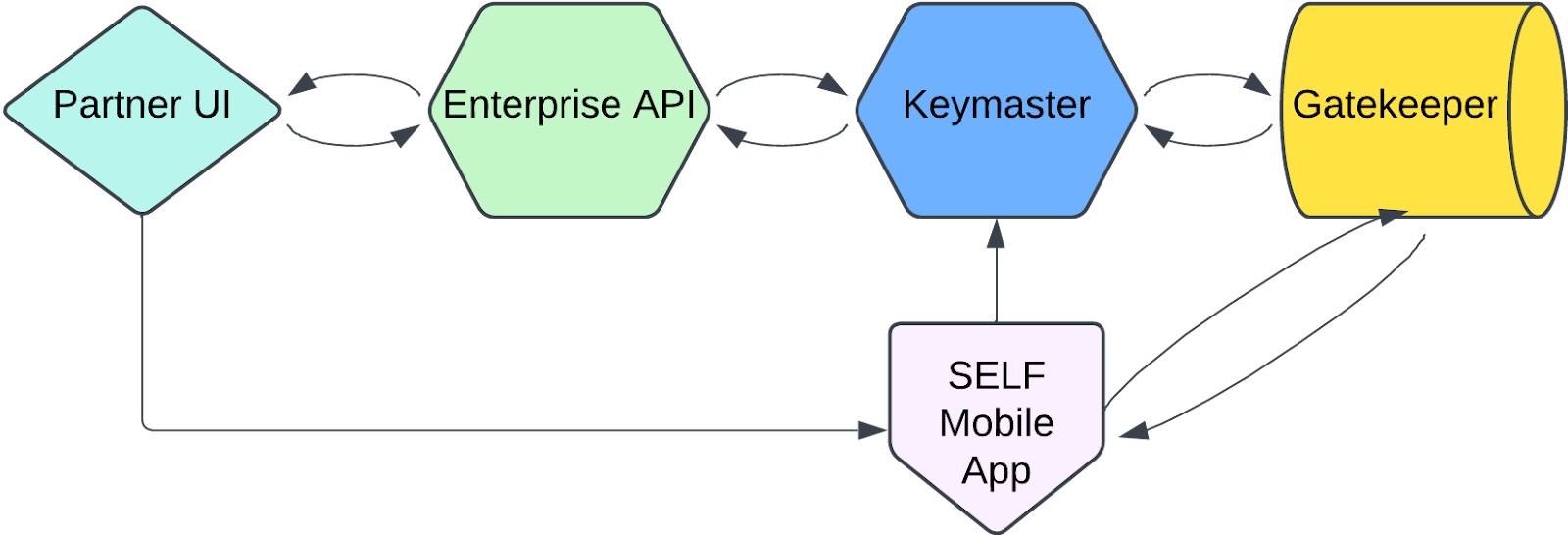
CYS involves generating challenges via a Keymaster and Gatekeeper, displaying the challenges to users, and fielding responses to the challenges. The challenge response contains the data requested of the user, and is necessary to fulfill some task in your application. Some examples of this are onboarding, requesting a user's birthdate, requesting a user's email, etc.
Fully implementing CYS requires a Keymaster service for signing challenges on behalf of your company or entity, UI code for displaying the signed challenges, and a Gatekeeper node for interaction with the SELF network.
This can be accomplished using the CYS SDKs and a series of docker files. There are several options for implementation that offer various advantages and disadvantages, and it's up to you to decide which option and strategy is right for you given your business needs, infrastructure strategy, and security posture. Regardless of your implementation strategy, the CYS flow generally looks like this:
-
A user clicks the CYS button on a partner webpage, which then renders the challenge generation component.
-
The UI requests a challenge from the partner's Keymaster service, which signs a transaction and submits it to the SELF network via the partner's gatekeeper node.
-
The Keymaster service sends a response to the partner UI containing the challenge DID and the challenge is displayed to the user via QR code.
-
The user then takes the SELF app and scans the QR code or clicks the app link button on the screen, which loads the challenge DID in the SELF app and fetches the associated challenge data from the SELF network.
-
The user can now see what data has been requested by the partner application and can decide to respond or not. If they choose to proceed, then a response is generated via the SELF network and the DID of the response is sent via HTTP and the challenge's callback URL field to the partner's Keymaster service.
-
Once the response DID has been received by the partner's Keymaster service, it then requests the associated response document from the SELF network. The Keymaster service then decrypts the response data using its wallet and completes whatever business logic it needs to do for the given flow. This typically looks like creating or updating a user in the system or something similar.
-
Finally, when the business logic is complete, the partner's Keymaster service needs to update the partner UI to notify the user that the flow is complete and either grant them access to authenticated application routes or ferry them along to the next step in a user flow.